The problem

Telling AI which element to fix is the hard part.

"Not the second card top-left… the grey button next to it."
"No, above that — actually the text inside it."
"Make the color darker… wait, not that one…"

The moment you describe an element in words, the conversation falls apart.

Here's the fix ↓
The fix · pin · prompt · patch

📍 Fix web UI
by pinning it.

Drop a pin on any element, write one line, and a code agent edits exactly that spot in the real source — no describing required.

Any site SPA · Next.js · Figma exports Login & bot-blocked Vanilla / React / Vue
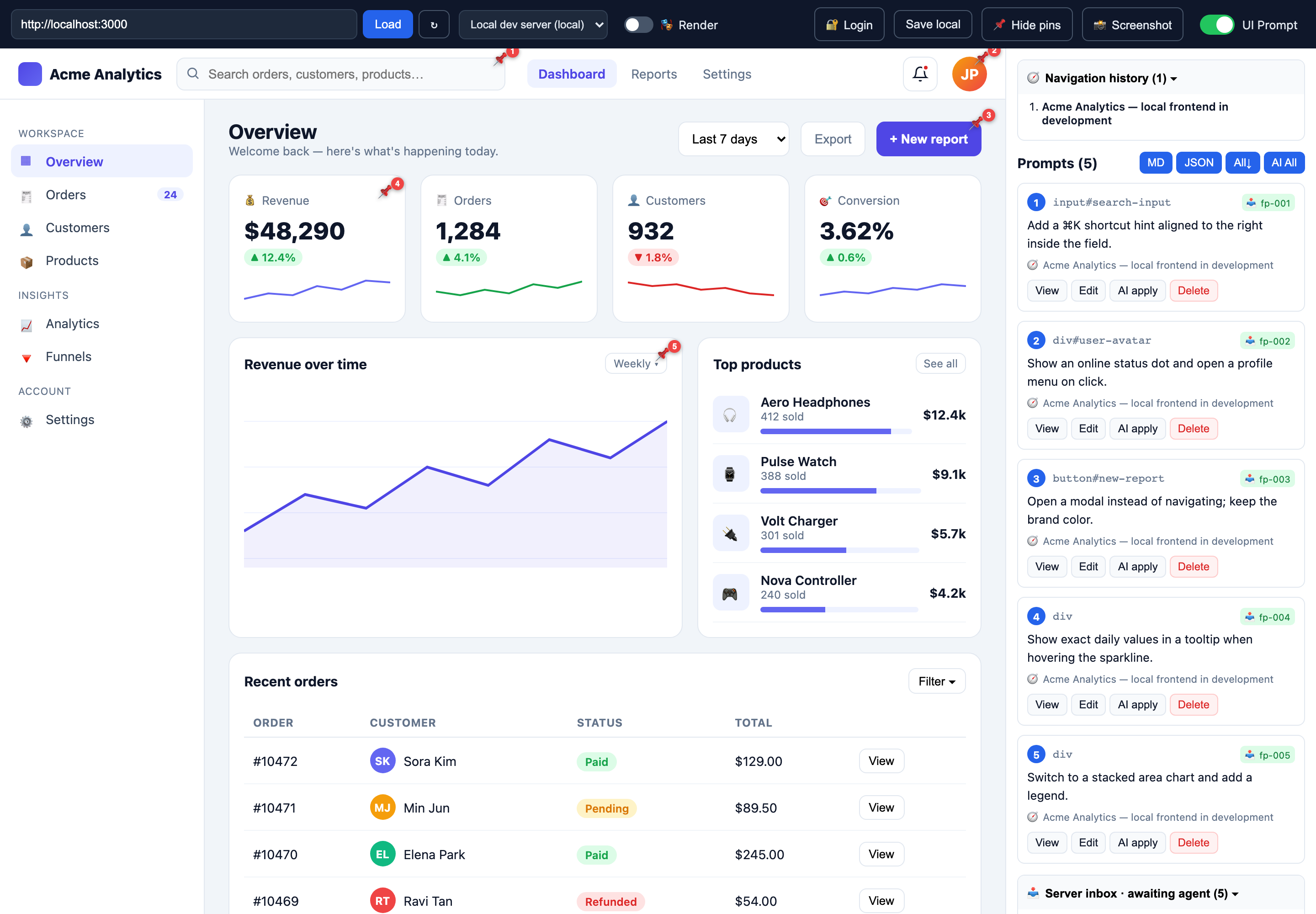
Multiple edit-prompt pins placed across a dashboard UI
Five edit-prompt pins on a live dashboard — each captures the element + your prompt, queued in the server inbox.
About

What is VisualPrompt?

VisualPrompt turns "pointing at something on screen" into a precise, machine-readable edit instruction. Toggle UI Prompt mode, click any element, and write the change in a popover. Each pin automatically captures the element's selector, xpath, bounding box, framework, data-testid, component name, and recent API calls — everything an agent needs to find and edit the real source.

It wraps any site three ways so the inspector can run on it: a rewriting proxy for built/static sites and local dev servers, a headless Playwright render for SPAs, login, and bot-blocked sites, and an MV3 browser extension that runs in your real tab for the hard cases (Next/Vite dev, logged-in screens). Collected pins are written as structured fixpoint files into a server inbox, where a code agent reads them, locates the source by search clues, edits it, and moves it to applied/.

Node + Express React + Vite Playwright Chrome MV3 MIT-friendly · self-hosted
The fix

One click becomes perfect context

1
🖱️
Click an element
2
📍
Pin + popover
3
✍️
Write a prompt
4
🤖
Agent edits source

Every pin auto-captures selector · xpath · rect · text · framework · data-testid · component · API calls.

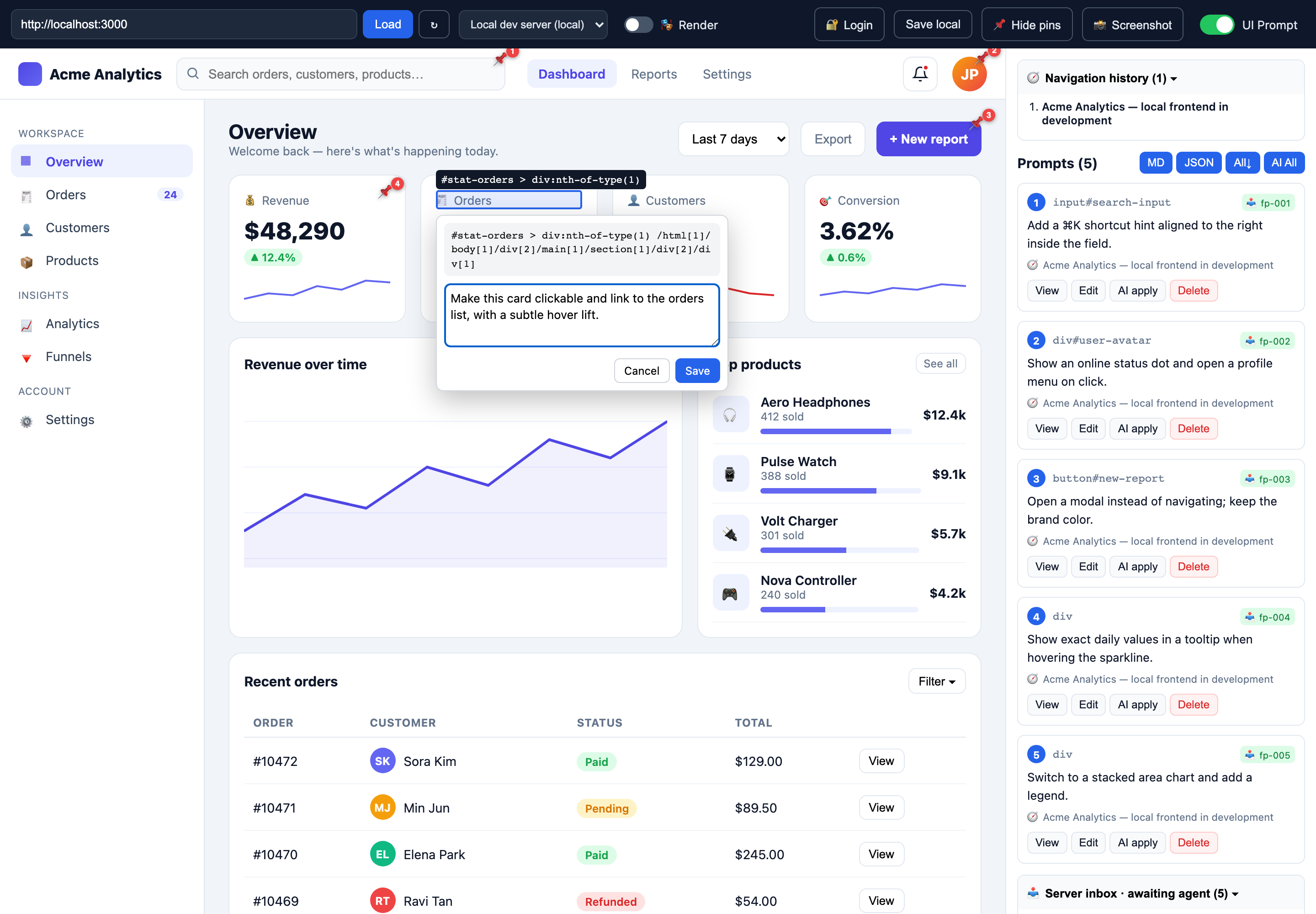
Writing an edit prompt in the popover with selector and xpath shown
The popover shows the element's selector / xpath; you just type the change you want.
Three collection paths

One inspector, three ways to get on the page

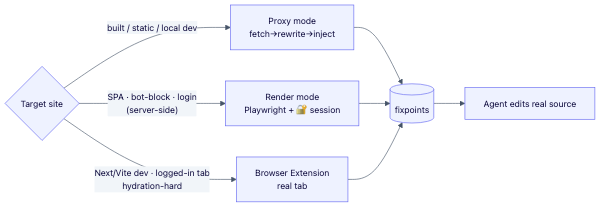
Whatever the site throws at you — a proxy for the easy cases, a headless browser for the hard ones, and a browser extension for everything else.

🪟 Proxy

Server fetches → rewrites every URL → injects the inspector → re-serves same-origin. Instant and interactive.

built & static sites · local dev

🎭 Render

Headless Chromium (Playwright) renders the finished DOM, then crawls / screenshots it. Login sessions injectable.

SPA · bot-blocked · server-side

🧩 Extension MV3

Runs in your real tab, so the app hydrates natively. Handles what a proxy can't.

Next/Vite dev · logged-in · hard sites
Diagram of the three collection paths feeding the fixpoint inbox
All three paths land their pins in the same server inbox.
Under the hood

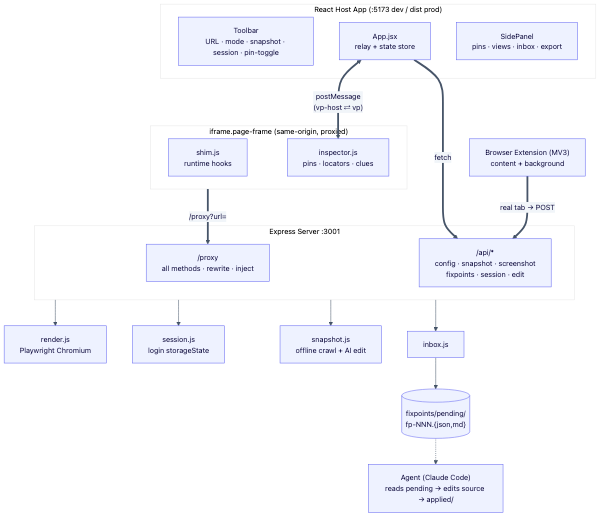
How any site gets wrapped & instrumented

01
React host shell
client/ · iframe · toolbar · side panel · two-way postMessage
02
Rewriting proxy
server/proxy.js · index.js · strip X-Frame/CSP · rewrite HTML/CSS/JS URLs · all HTTP methods · cookies · Range
03
Injected inspector
shim.js · inspector.js · hook fetch/XHR/setAttribute · pins · DOM locators · source clues
04
Fixpoint inbox
inbox.jsfixpoints/pending/fp-NNN.{json,md} · agent reads, edits source, moves to applied/
System architecture diagram
Agent handoff

A pin becomes a work order

Each pin is written as one structured file. The agent finds the source by search terms (no fragile selectors), edits it, and moves the file to applied/.

selector + xpath + rect data-testid · component framework + API paths candidate file globs
# fixpoints/pending/fp-001.md ## Edit instruction Make this the primary CTA, open a modal. ## Target element selector: #new-report xpath: /html/body/div[2]/main/... ## Source-code search clues data-testid="new-report-btn" component:NewReportButton candidate: **/NewReportButton*.tsx
Battle-tested

Hardened against 1,000 real websites

1,000
representative sites auto-verified through the proxy
63.8%
load + stay interactive directly through the proxy
~78%
of failures are site-side blocks — the extension bypasses them
+26
sites recovered by the www / http fallback chain
Bare-specifier preservation — stops import-maps (three.js) from dying
Range / Content-Range passthrough — audio & video playback + seeking
Sec-Fetch-Dest MIME — fixes text/css modules & Unexpected token '<'
Set-Cookie rewrite + manual redirect — real login flows work
All HTTP methods + body forwarding — POST/PUT APIs, not just GET
Service-worker neutralization, favicon guard, fetch timeout (504)